
Documentation
r2-list home
Serverless dashboard for Cloudflare R2 storage









Why CDN Admin?
Cloudflare R2 is powerful, but day-to-day operations often require more than the CLI:
- Visual browsing of buckets & folders
- Fast file inspection and copyable URLs
- Object organization without leaving the browser
- Optional Cloudflare Access protection
- Telemetry via D1 for usage and observability
CDN Admin is a production-style dashboard you can deploy in under 2 minutes.
Features
- Hierarchical folder & file browser (R2 native listing)
- Rename, move, delete, and organize objects with instant edge execution
- One-click public URL copy with clipboard integration
- D1-backed telemetry (downloads, size, activity)
- Optional Cloudflare Access protection
- Zero backend — runs entirely on Workers + R2 + D1 at the edge
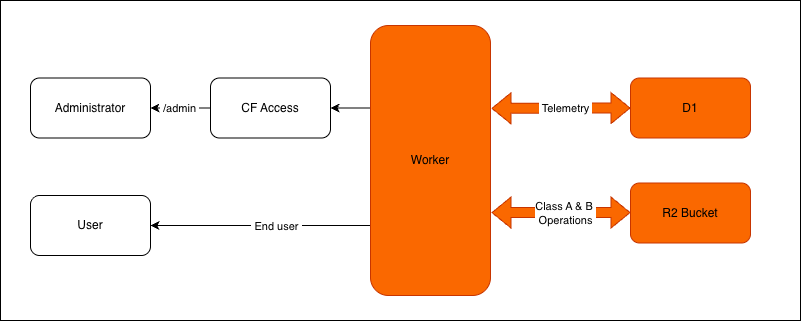
Architecture
- Frontend: Static HTML + Tailwind + Lucide icons (served from R2)
- Backend: Cloudflare Worker API (no traditional server)
- Storage: Cloudflare R2
- Telemetry: Cloudflare D1
- Security (optional): Cloudflare Access
Quick Deploy (Recommended)
Creates:
This deploy flow automatically provisions:
- R2 bucket (or connect an existing one)
- D1 telemetry database
- Worker bindings
- Production deployment on Cloudflare Workers
Requires an active Cloudflare R2 subscription.
Developer tools for local development can be accessed at
docs/DevTools.md
Environment Variables
| Variable | Purpose |
|---|---|
| AUTH_STATUS | dev disables Access auth checks (prod enables access) |
Default:
AUTH_STATUS=dev